Download Pinterest Videos, Images, and GIFs Online
Pinterest is full of creative ideas—from step-by-step recipes and quick workouts to DIY home hacks and travel guides. But while saving Pins to your boards is easy, Pinterest doesn't let you download videos directly to your phone's camera roll or computer for offline watching.
That's where PinterestVideo.com comes in. Whether you want to keep a cooking tutorial handy for offline cooking or save a workout video for the gym, our free online tool converts public Pinterest links into high-quality MP4 files in seconds.
How to Download Pinterest Videos in 3 Easy Steps

Step 1: Copy Pin Link
Open Pinterest, tap Share on your video or Idea Pin, and choose Copy Link.

Step 2: Paste the Link
Paste the copied URL into the downloader box at the top of this page and click Download.
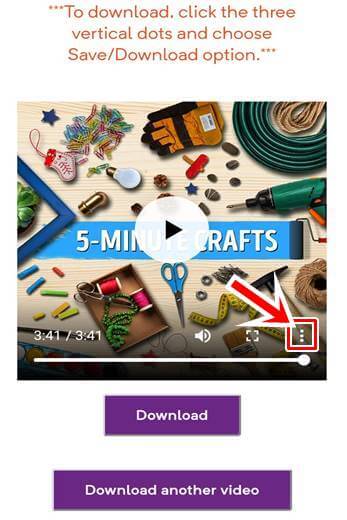
Step 3: Save Your Video
Pick your preferred HD quality option and save the MP4 file straight to your device.
Why Choose PinterestVideo Over Other Methods?
Our tool is designed to save media quickly and cleanly without forcing you to install extra software or sign up for accounts.
| Feature | PinterestVideo.com | Browser Extensions | Third-Party Apps |
|---|---|---|---|
| No Installation Needed | ✅ 100% Web-Based | ❌ Desktop Extension Required | ❌ App Store Download Required |
| Works on Mobile & PC | ✅ iPhone, Android, Mac & PC | ❌ Desktop Browsers Only | Varies |
| Idea Pins & Carousels | ✅ Fully Supported | ❌ Limited Support | ❌ Frequently Restricted |
| HD MP4 Quality Options | ✅ 720p HD & 480p SD | Varies | ❌ Watermarked / Paywalled |
| 100% Free & Unlimited | ✅ Free Always | ✅ Free | ❌ Subscriptions / Heavy Ads |
Download Pinterest Videos on Android or iPhone
Follow these simple step-by-step instructions to save high-quality Pinterest videos directly to your mobile device's gallery.
Download on Android
- 01 Open the Pinterest app and navigate to the video you want.
- 02 Tap Share and select Copy Link.
- 03 Open Chrome, Firefox, or your browser and visit PinterestVideo.com.
- 04 Paste the link into the search box and tap Download.
- 05 Find your saved video in your phone's Downloads folder or Gallery.
Download on iPhone (iOS)
- 01 Open Pinterest on your iPhone and select your desired video Pin.
- 02 Tap Share and then select Copy Link.
- 03 Open Safari and visit PinterestVideo.com.
- 04 Paste the link into the input box, tap Download, and accept the prompt.
- 05 Access your clip in Safari Downloads or save it directly to your Photos App.
Video Tutorial
Supported Pinterest Links & URL Formats
Our parser automatically detects and processes all valid media link formats generated by official Pinterest web and mobile apps.
Standard Video Pin URLs
✓ SupportedDirect web browser links copied from desktop or mobile web browsers.
https://www.pinterest.com/pin/123456789012345678/ Shortened App Share Links
✓ SupportedShort links generated when sharing media directly from the Pinterest App.
https://pin.it/aBc12Xy Idea Pins & Story Video Links
✓ SupportedMulti-page video stories and creator idea pin formats.
https://www.pinterest.com/idea-pin/123456789012345678/ Regional Domain Links
✓ SupportedLocalized country domains (.de, .co.uk, .ca, .fr, etc.).
https://de.pinterest.com/pin/123456789012345678/ Safety, Copyright & Reposting Guidelines
When downloading media from Pinterest, keep these basic usage and legal rules in mind to stay protected.
Personal vs. Commercial Use
Copyright RuleDownloading a video for offline viewing (like keeping a recipe handy) is fine. However, re-uploading someone else's content to YouTube, TikTok, Instagram, or monetized ads without permission violates copyright laws.
Giving Credit Isn't Licensing
Best PracticeTagging the original creator is great practice, but it doesn't give you automatic rights to reuse copyrighted work. Always ask for explicit permission if you plan to share it publicly.
Protect Your Password
Account SecurityPinterestVideo will never ask for your Pinterest login, password, or personal details. Be wary of third-party tools requiring sensitive account permissions.
Latest Tool Updates & Recent Bug Fixes
We continuously monitor server performance and Pinterest platform updates to maintain peak performance. Here is our log of recent maintenance releases:
v2.4.2 — Domain Security & Safety Audit Verification
- Completed independent safety checks with major web security tools to confirm clean, safe browsing.
- Verified live security status report: Google Safe Browsing, SSLTrust, Sucuri SiteCheck, and Norton Safe Web.
v2.4.1 — Short Link Redirection & Force Download Upgrade
- Resolved issue where shortened
pin.itmobile links failed to resolve properly during peak traffic hours. - Added direct Force Download trigger header to automatically start MP4 downloads without opening media preview tabs.
- Fixed
0 KBfile size download errors on Android mobile browsers during high-bitrate video extractions.
v2.4.0 — Idea Pins Support & Extractor Parser Upgrade
- Full support added for multi-page Idea Pins and video stories with high-definition audio extraction.
- Updated video parser engine to support Pinterest's newly introduced CDN URL structures.
- Improved average download preparation speeds by 35% on mobile networks.
v2.3.8 — Audio Sync & Safari iOS Patch
- Fixed a subtle audio-video desync glitch affecting extended MP4 video downloads on iOS Safari.
- Enhanced paste button compatibility across all major mobile browsers.
Frequently Asked Questions
Find quick answers to common questions about downloading Pinterest videos, audio, and media files.